}); Micromax Unite2 development

for the Unite-ns

manojthoomannil@gmail.com

amazon

amazon1

amazon 2

Search This Blog

Translate

Unleash the power of Unite2

Custom roms:tutorials:updates.

Unleash the power of Unite2

Custom roms : Tutorials : Updates

Xplore the possibilities in ur Unite2

Lets break the barriers and enjoy!

THEMED-STOCK ROM

Hi all,
Here is a different rom !
Themed Stock
Based on Flash Tool based Stock rom SC
Themed rom
Shared storage
3 Different themes options  : Red-Black theme, Blue-Black theme & Transparent Quick Settings.
(RB is default, you can flash other theme zip files over it)
Preadded quickboot apk, xender, xposed apk and gravity box
Eleven Music Player added as default 
All necesarry tweaks for the best performance
Changed stock default wallpaper
Its 4G !! Placed 4G icon instead of usual 3g !
Bugs : not expected any as it is stock rom

Credit: Manoj Thoomannil (me)


Blue-Black Theme: Blue-Black Theme TSR Rom

Transparent Quick Settings : Transparent QuickSettings TSR Rom

Default Stock Theme : Stock Theme


Flashing Procedure:

Put the Rom zip in SD card 
Enter recovery,clear cache,dalwik  cache & facotry reset
Install rom
Reboot

Xposed framework apk is preinstalled but will work only after flashing Xposed zip. (If you dont have the zip file, download from  LovelyPop rom post in this blog itself).

Thanks for reading.....Enjoy!


LOVELYPOP ROM


Lovely Pop Rom for Micromax A106


Based on MMX A106 Stock lolipop 5.0

Developer : Manoj Thoomannil (myself)

Features:
Fly launcher as default- themes download support
Transparent status bar
Pre-added apks -
Xposed , Gravity box , Quick boot and Xender
Shared storage
OTG  
Minions bootanimation
'Eleven' Music player as default
ES file explorer pro as default file manager
Airtel musical violin as second sim default ringtone ( for a change !)

Browser not pre-added, so use whichever u like.


Hope you will love this rom ! please try.


Rom link : LovelyPop Rom link with transparent status bar

CTR V3 recovery : CTR V3
(Better to flash all shared LP roms in CTR V3)
Transparent status bar patch (only if you have download the rom before 10/07/16. If you are going to download the rom now, no need to download the below patch) :
Transparent status bar patch link LovelyPop


Xposed link: Xposed V38 sdk21 zip


Procedure:

Put the above  zip files  in SD card or OTG ( transparent zip not needed  if  u have just downloaded the rom)

Enter your phone's custom recovery

Wipe data, factory reset

Select 'install zip', choose Lovelypop zip

After flashing, reboot.
After finishing initial set up, again go to recovery ( quikboot apk is there for easy access to recovery)

After reboot, select QuickBoot apk, go to recovery, select Transparent status bar zip then flash it.
Install Xposed zip, then reboot.

To activate Xposed, click on the apk file and reboot.

Thats all  ! enjoy!

See video here :
Lovelypop rom video


Orange leaf LP


Hi,


I have ported another LP for Micromax A106;  it is called Orange leaf  LP 5.0


Features :

Ported from Orange Leaf mobile
Shared storage
Lolipop 5.0
SD default storage
Relatively light size: 377 mb
Different style icons
ES file explorer pro as File Manager
Tweaked for better performance, image clarify, better internet speed etc.

Bug : LED


Rom Link : mediafire link

CTR V3 recovery :CTR V3
(Better to flash all shared LP roms using CTR V3 recovery)


Procedure:

Put rom zip in SD card
Enter your phone's recovery (CTR V3 recommended)
Wipe cache, dalwik cache & factory reset
Install zip-choose zip from SD card.
Reboot; Done.


Screen Shots:


RIVO RX2OO LP 5.0

Here is another lolipop rom for Micromax Unite2
Ported from Rivo RX200 by me
Features:
StockLP
Colorful interface than usual LPs
Shared storage with SD default

Different themes option
Font chooser option
Tweaks added for better performance camera net speed  etc.
Bugs:
LED not working
Screen shots:


Link: Rivo RX200 mediafire link
CTR V3 link  CTR V3 recovery

PRESTIGIO 5.0.2 LP for Unite2


Hi,


Here is a 5.0.2  rom for our Unite2.

Truly an outstanding custom rom.  Ported from  the prestigious Prestigio smartphone model 3530 Duo.


Rom features:

Lolipop 5.0.2
Cool User Interface
OTG supported
Shared storage
SD default
Good battery back up.
Xposed  modules working
Transperant status & quick settings
Different colors for quick settings icons- for ON and OFF modes
Float dial option (quick settings) for easy dialing
Dark themed settings panel
8 mp rear camera & 5 mp front camera - awesome camera clarity
Preferred install location selection option
Good rom for Unite 2 to play high end games - Antutu benchmark test given 17596
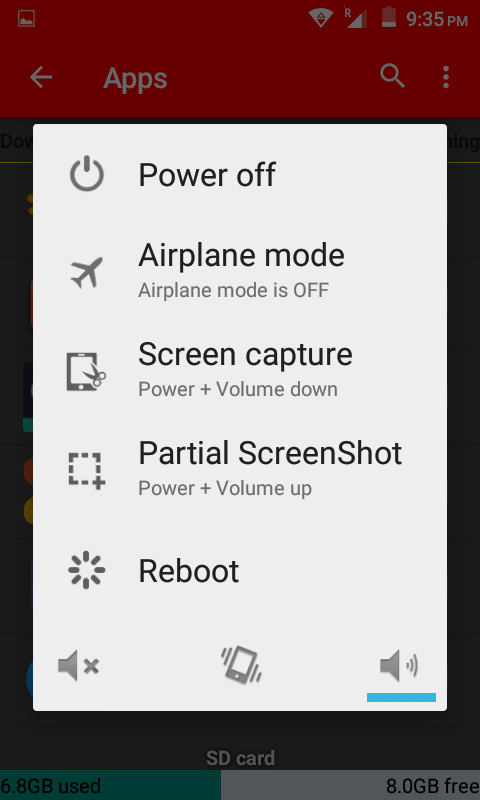
Screen shot & partial screen shot options in power menu.
Shake to take screen shot option in settings.
Tweaks added for better net connectivity, image quality etc.


Bug;

Charging indication LED.  Notification LED working fine.


Rom Link : Prestigio 5.0.2 for A106


Flashing procedure;

Reboot to custom recovery
Wipe cache, dalwik cache & do factory reset
Flash Prestigio LP rom
Reboot.

Firmware source : needrom

Prestigio 3530 Duo phone specification link : Prestigio.com


Screen Shots :


PRESTIGIO KK ROM FOR A106


Now most people have experienced Marshmallow version and waiting for next 'N' android version. Then you may think that Kitkat is outdated, but still many people like to use KK roms due to its stability and other positives.  I personally like KK roms over LP thatswhy I tried to port this rom. 
It is my 6th  port after Flamefox KK,GamaKK,Landrover KK, No.1M2 LP & Uber Avvio LP.

About this rom;

Kitkat 4.4.2
Ported from Prestigio 5455 DUOS
Good camera clarity. QR scanner is integrated in the camera apk.
Good sound clarity without any modification.
SD card default storage.
Shared storage.
King root apk preadded.
Xposed and its modules working fine.

Bugs:
Not found any.
Note: Dont try to use OTA update. It will not work. You will only lose download data ! So keep it off.

Screen Shots:


Rom Link(direct) : Prestigo KK for A106 
Installation guide:
Put this zip in SD card
Install any custom recovery in your MMX A106

Enter recovery mode, wipe cache, dalwik cache & do factory reset
Install zip from SD card
Reboot 
ENJOY!
THANK YOU FOR READING...